How Entra ID and Cisco ISE authentication with resource owned password credentials works
Summary
The key components involved in the Entra ID authentication with resource owned password credentials process are:
-
User: Logs in with credentials using a VPN client
-
Cisco Secure Client: VPN client that sends user credentials
-
Entra ID (formerly Azure AD): Validates credentials and issues tokens
-
Cisco ISE: Receives tokens and manages user sessions
-
Cloud-Delivered Firewall Management Center: Receives user sessions from ISE
Workflow
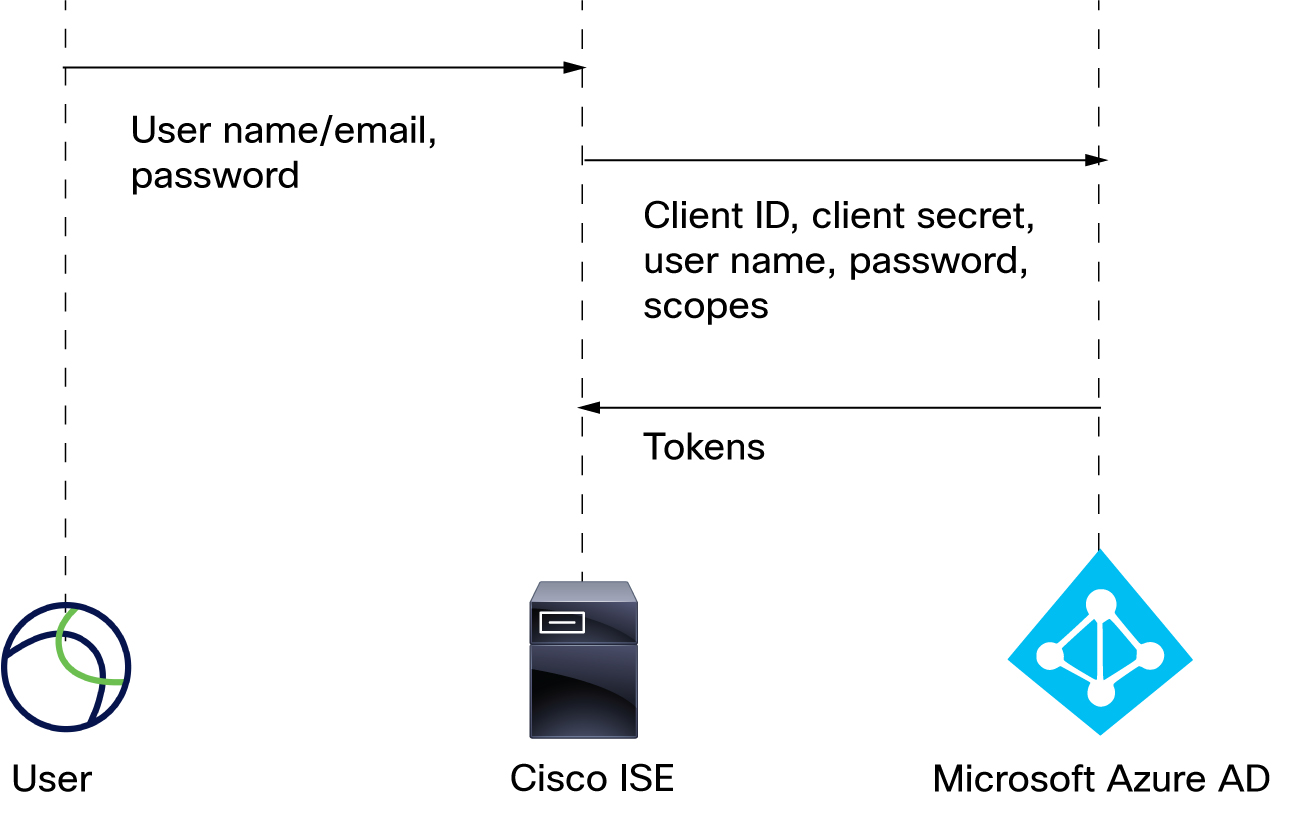
These stages describe how Entra ID and Cisco ISE authentication with resource owned password credentials works:
- The user logs in with a user name (or email address) and password using a VPN client like Cisco Secure Client.
- The client ID, client secret, user name, password, and scopes are sent to Entra ID.
- Tokens are sent from Entra ID to Cisco ISE, which sends user sessions to the Cloud-Delivered Firewall Management Center. For details about configuring Cisco ISE, see Configure ISE 3.0 REST ID with Azure Active Directory. Additional resource: Microsoft identity platform and OAuth 2.0 Resource Owner Password Credentials on learn.microsoft.com.