Monitor and verify geolocation-based access control policies
Use these monitoring and verification procedures to ensure that geolocation-based access control policies are working correctly for remote access VPN users. Monitor active sessions in the dashboard, review denied sessions through syslog, and verify policy configuration using CLI commands.
Monitor active remote access VPN sessions in remote access VPN dashboard
Choose .
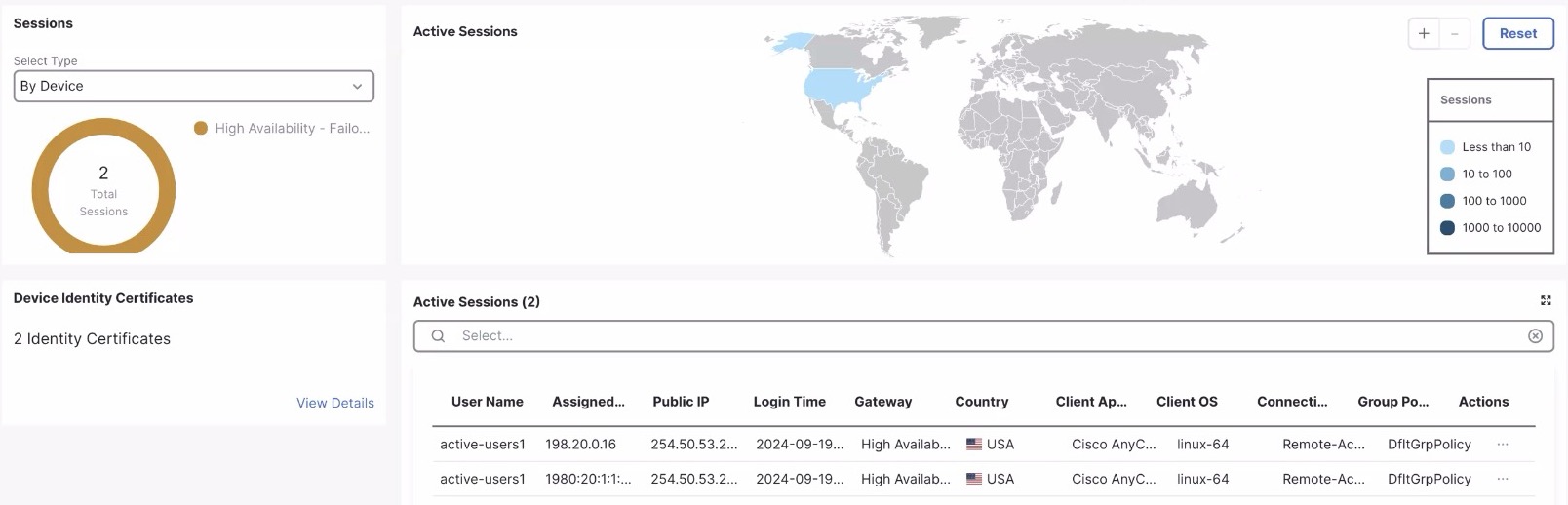
Monitor denied remote access VPN sessions
Monitor denied remote access VPN sessions at . To view these sessions, configure syslog settings in the Firewall Threat Defense device.
-
Choose and create or edit a threat defense policy.
-
In the left pane, click Syslog.
-
Click the Logging Setup tab.
-
Check the Enable Logging check box.
-
Click the VPN Logs radio button.
-
From the Logging Level drop-down list, choose 6 - informational.
-
Click Save.
Note | You cannot view the denied remote access VPN sessions if the All Logs option is configured with a Logging Level between 0 and 2. |

Verify service access policies
From the Firewall Threat Defense device CLI, run these commands:
-
show running-config service-access : Displays the user-defined service access policies.
firepower#show running-config service-access service-access deny geolocation OBJGRP_Asia1 service-access permit interface outside ra-ssl-client geolocation OBJGRP_India service-access deny ra-ikev2 geolocation any -
show service-access : Displays details of the user-defined service access policies.
firepower# show service-access
1 outside         : ra-ikev2 ra-ssl-client (permit) hits = 8288
  Last hit time   : 10:58:10.038 IST Tue Jul 16 2024
  object-group    : FMC_INTERNAL_XXY
2 any             : ra-ikev2 ra-ssl-client (deny) hits = 123
  Last hit time   : 11:23:12.032 IST Tue Jul 17 2024
  object-group    : any
firepower# show service-access detail 1 outside : ra-ikev2 ra-ssl-client (permit) hits = 8288 Last hit time : 10:58:10.038 IST Tue Jul 16 2024 object-group : FMC_INTERNAL_XXY geolocation : Egypt(818) Jordan(400) Iran (Islamic Republic of)(364) Saudi Arabia(682) -
show geodb : Displays details of the geolocation table.
show geodb{ ipv4| ipv6| counters| context}[ location country_name| lookup ip_address][ detail]
-
show geodb{ ipv4| ipv6} : Displays the total number of IPv4 or IPv6 address mappings.
firepower# show geodb ipv4 Geolocation Table - IPv4 Total number of mappings available: 532507 Last geolocation data read time: 17:02:13.000 IST Thu Jul 18 2024 Running geolocation update version: 2024-02-15-019 -
show geodb{ ipv4| ipv6} location country_name detail : Displays the details of the IPv4 or IPv6 address mappings.
firepower# show geodb ipv4 location Antarctica detail Geolocation Table - IPv4 id=0x00007fff82c284e0, geo_id=10, hits=0 range_lower=77.70.176.176, range_upper=77.70.176.183 id=0x00007fff82cca360, geo_id:10, hits=0 range_lower=79.110.169.69, range_upper=79.110.169.69 Total number of mappings available: 28 -
show geodb counters : Displays the details of active, permitted, and denied sessions.
firepower# show geodb counters current – ongoing sessions permitted – cumulative permitted sessions denied – cumulative denied sessions Location current permitted denied Egypt 0 0 5 India 45 1345 45 -
show geodb{ ipv4| ipv6lookup ip_address : Displays the geolocation of a specific IPv4 or IPv6 address.
firepower# show geodb ipv4 lookup 223.223.128.24
Geolocation of 223.223.128.24 is "India" (356) with id=0x000015114d0aa330
Matching network range: 223.223.128.0 - 223.223.159.255
-