Add block connections
This task enables you to block outbound connections based on either old SSL or TLS versions or based on the server certificate status, enhancing security by preventing connections using insecure protocols or untrusted certificates.
This task discusses how to block connections based on either old SSL or TLS versions; or based on the server certificate status.
Note | Blocking affects all outbound connections and takes precedence over all other bypass and decryption conditions you choose. |
Before you begin
Complete the tasks discussed in Create a standard decryption policy with outbound protection.
Procedure
Step 1 | Locate the Block connections section. |
Step 2 | To block outbound traffic based on its SSL or TLS protcol version, slide Block based on TLS versions to Slider enabled ( |
Step 3 | To block outbound traffic based on server certificate status, slide Block based on certificate status to Slider enabled ( |
Step 4 | You have the following options:
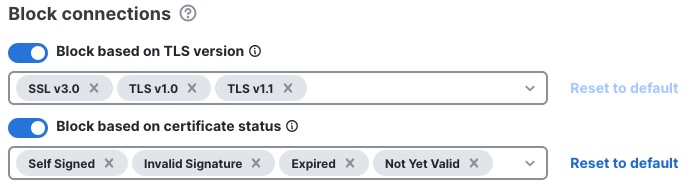
The following figure shows an example of blocking traffic with both TLS versions and server certificate status. Self-signed was added to the list of server certificates to block.
|
Step 5 | If you're finished configuring your policy, see Decryption policy actions. |