Enable conflict detection
Enable conflict detection to receive alerts when changes are made to a device outside of Security Cloud Control.
Enabling conflict detection alerts you to instances where changes have been made to a device outside of Security Cloud Control.
Procedure
Step 1 | Choose . |
Step 2 | Click the Devices tab. |
Step 3 | Select the appropriate device type tab. |
Step 4 | Select the device or devices for which you want to enable conflict detection. |
Step 5 | In the Conflict Detection box at the right of the device table, select Enabled from the list. 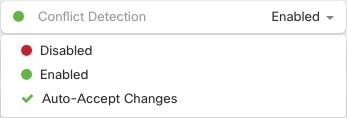
|
Conflict detection is enabled for the selected devices and will alert you to external changes made to those devices.