Object filters
Use filters on the Objects page to find objects by device, issue, shared state, association state, object type, or search value. You can also include or exclude system-defined objects.
The object type filter lets you filter by object types such as network object, network group, URL object, URL group, service object, and service group. The shared objects filter lets you filter objects that have default values, override values, or additional values.
You can combine device and object filters to create focused search strategies. For example, you can search for objects that match this logic: Issues is Unused OR Inconsistent, AND Shared Objects has Default Values OR Additional Values, AND Unassociated Objects is selected.
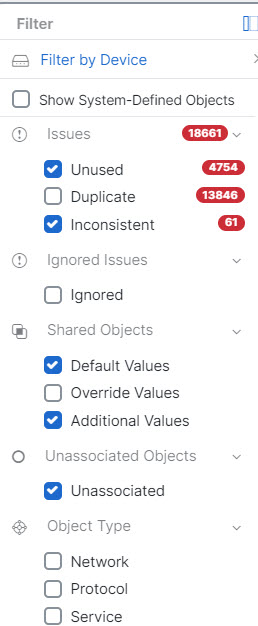
To filter, click  in the left-hand pane of the Objects tab:
-
Filter by Device: Shows objects found on selected devices.
-
Show System-Defined Objects: Includes predefined system objects in search and filter results. System objects cannot be edited or deleted. Some devices come with predefined objects for common services. These system objects are convenient because they are already made for you and you can use them in your rules and policies. There can be many system objects in the objects table. System objects cannot be edited or deleted.
-
Issues: Shows unused, duplicate, or inconsistent objects. If you select more than one issue, objects in any selected issue category are included.
-
Ignored Issues: Shows objects whose issues were ignored by an administrator.
-
Shared Objects: Shows shared objects. You can filter by default values, override values, additional values, or a combination.
-
Unassociated Objects: Shows objects that are not associated with any rule or policy.
-
Object Type: Shows selected object types, such as network objects, network groups, URL objects, URL groups, service objects, and service groups.
Within a main filter, subfilters can further narrow the results by object type, such as Network, Service, or Protocol. Filters across categories combine with an AND relationship. Multiple selections within a category can combine with an OR relationship.
For example, a filter set can search for objects that match this logic: objects on selected devices AND inconsistent objects AND network objects or service objects AND object names that contain group.