Analyze packet tracer results
This task helps you understand the reasons behind packet tracer results, whether packets are dropped or allowed, and enables you to make necessary configuration changes to achieve desired access results.
Packet tracer provides detailed information about packet processing decisions. When you run packet tracer, you receive results that show whether packets are allowed or denied, along with the specific rules and policies that influenced these decisions.
Procedure
Step 1 | Expand a row in the packet trace table to view detailed rule or logging information. Whether the packet is dropped or allowed, you can learn why by expanding a row in the packet trace table and reading the rule or logging information related to that action. The expanded view shows the specific access list policy and rules that affected the packet, such as a rule to deny an IP packet coming from any source and going to any destination. |
Step 2 | If the action is not what you want, click the View in Network Policies link to edit the rule. This link allows you to immediately access and modify the relevant network policy rule. |
Step 3 | Deploy the configuration change to the ASA after editing the rule. |
Step 4 | Re-run packet tracer to verify that you get the expected access results. |
Step 5 | Review the ASA real-time logging from the ASA. Along with the packet tracer results, Security Cloud Control displays the real-time logging from the ASA. 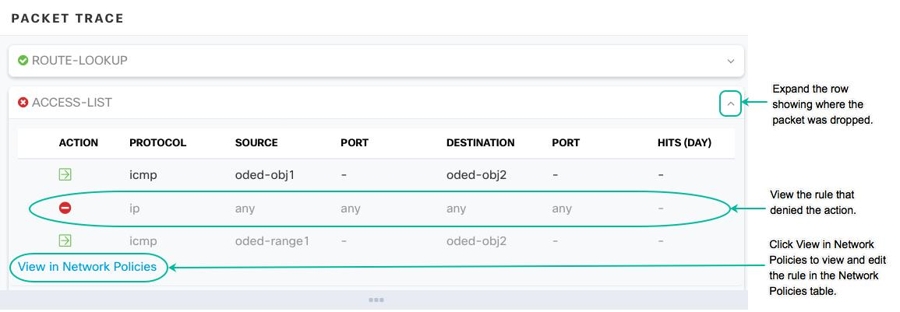
|
You have successfully analyzed the packet tracer results and understand the reasons for packet processing decisions. Any necessary rule modifications have been deployed and verified through re-running packet tracer.