Transport/network layer preprocessor settings
Transport/network layer preprocessor settings are access control policy configurations that
-
apply globally to all networks, zones, and VLANs where you deploy your access control policy
-
control how the system handles VLAN headers, active responses, and connection tracking, and
-
affect traffic reassembly and rule processing for transport and network layer communications.
Configuration options
These settings control various aspects of transport and network layer processing:
-
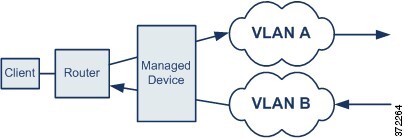
Ignore the VLAN header when tracking connections—Whether to ignore or include VLAN headers when identifying traffic. Different VLAN tags in traffic traveling in different directions for the same connection can affect traffic reassembly and rule processing. For example, traffic for the same connection could be transmitted over VLAN A and be received over VLAN B. Select this option if the device might see different VLANs for the same connection. This option is off by default.
-
Maximum Active Responses—For a TCP connection that triggers a preprocessor/intrusion drop rule that is configured to provide an active response, the maximum number of active responses per TCP connection. When additional traffic occurs on a connection where an active response has been initiated, and the traffic occurs more than Minimum Response Seconds after a previous active response, the system sends another active response unless the specified maximum has been reached. A setting of 0 disables additional active responses triggered active response rules. The default is no limit. The range is 0 to 25.
NoteYou have to specifically configure drop rules to provide active responses. For TCP connections, the active response is a RESET packet. For UDP connections, the system sends an ICMP unreachable packet to the source of the connection.
-
Minimum Response Seconds—Until Maximum Active Responses occur, specifies the number of seconds to wait before any additional traffic on a connection where the system has initiated an active response results in a subsequent active response. The default is no limit. The range is 1 to 300.
-
Session Termination Logging Threshold—Do not modify this option unless instructed to do so by Cisco Technical Support.
Support might ask you during a troubleshooting call to configure your system to log a message when an individual connection exceeds the specified threshold. Changing the setting for this option will affect performance and should be done only with Support guidance. This option specifies the number of bytes that result in a logged message when the session terminates and the specified number was exceeded. The upper limit is 1GB.