Configure ECMP zones on your device
Configure Equal-Cost MultiPath (ECMP) to enable efficient traffic handling through the device with support for asymmetric routing, load balancing, and traffic rerouting when a path becomes unavailable.
This example demonstrates how to use Cloud-Delivered Firewall Management Center to configure ECMP zones on Firewall Threat Defense such that the traffic flowing through the device is handled efficiently. With ECMP configured, Firewall Threat Defense maintains the routing table on a per-zone basis, enabling efficient packet re-routing. Thus, ECMP supports asymmetric routing, load balancing, and traffic rerouting when a path becomes unavailable. In this example, R4 records the two paths to reach the external file server.
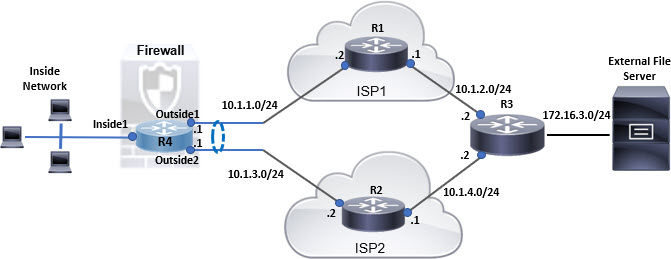
Follow these steps to configure ECMP on your device:
Procedure
Step 1 | Create a virtual router. Set up a new router on R4 with interfaces: Inside1, Outside1, and Outside2. For more information, refer to Create virtual router. 
|
Step 2 | Create ECMP zones:
|
Step 3 | Create static routes for the zone interfaces:
Ensure that you specify the same metric but different gateways for the static routes: 
|
Step 4 | Save and deploy the changes to apply ECMP routing to your device. |


Network packets will now utilize efficient routes to reach their destination R3, either through R4>R1>R3 or R4>R2>R3, according to the ECMP algorithm configuration. If the R1>R3 route becomes unavailable, traffic can be rerouted through R2, which helps reduce disruption during path failure. Additionally, return traffic from R3 can arrive on Outside2 even if the original packet was sent through Outside1. When network traffic is heavy, R4 distributes the network load between two specified routes to maintain balanced traffic.