Cloud-Delivered Firewall Management Center licensing and registration
Register Cloud-Delivered Firewall Management Center with Cisco Smart Licensing the same way you would for On-Premises Firewall Management Center.
Overview
Cloud-Delivered Firewall Management Center is included with the base subscription and trial for Security Cloud Control Firewall Management. You do not need to purchase a separate license for Cloud-Delivered Firewall Management Center. The base subscription or trial covers Cloud-Delivered Firewall Management Center, enabling you to manage Firewall Threat Defense devices through the cloud.
Cloud-Delivered Firewall Management Center is provisioned with a 90-day evaluation license upon deployment.
Important | We strongly recommend registering Cloud-Delivered Firewall Management Center with Cisco Smart Software Manager immediately after deployment to access all features, including those requiring export encryption such as Remote access VPN and SSL VPN. Early registration prevents feature limitations and deployment interruptions. |
Evaluation license
-
Features requiring export encryption, such as Remote Access VPN, SSL VPN, and other encryption-dependent options, remain disabled until you register Cloud-Delivered Firewall Management Center with Cisco Smart Software Manager (CSSM).
-
After the 90-day evaluation period ends, you can continue onboarding Firewall Threat Defense devices, but manually triggered or scheduled deployments are blocked until registration with CSSM is completed.
-
Security Cloud Control Firewall Management sends alert notifications as the evaluation license nears expiration.
NoteThe Smart license field displays a warning when the evaluation license is expiration.
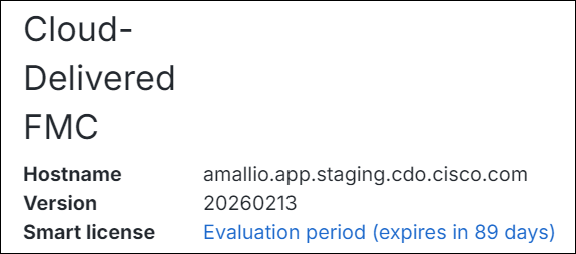
When the evaluation period ends, Cloud-Delivered Firewall Management Center is unregistered. Registering Cloud-Delivered Firewall Management Center with Cisco Smart Software Manager converts from evaluation mode to a fully licensed state.
Click the evaluation warning link to open the smart licensing registration page and register Cloud-Delivered Firewall Management Center with Cisco Smart Software Manager.
Registration with Cisco Smart Software Manager (CSSM)
-
Connect Cloud-Delivered Firewall Management Center to your smart licensing account, following the same process as On-Premises Firewall Management Center. The high-level procedure is provided in this section.
-
No separate license purchase is needed for Cloud-Delivered Firewall Management Center; the license is automatically applied upon registration.
-
Registering with smart licensing enables encryption export features (only if your license token is enabled for export controlled compliance).
-
Registration ensures compliance and prevents deployment issues.
To learn how to get a Cloud-Delivered Firewall Management Center provisioned on your Security Cloud Control tenant, see Request a Cloud-Delivered Firewall Management Center for your Security Cloud Control Tenant.
Licensing for Firewall Threat Defense devices
-
No separate license purchase is needed for Cloud-Delivered Firewall Management Center.
-
Each Firewall Threat Defense device managed by Cloud-Delivered Firewall Management Center requires an individual license.
-
After registering Cloud-Delivered Firewall Management Center with CSSM, an administrator may apply feature licenses to security devices.
Step-by-step registration
A high-level procedure is provided here. For detailed steps, see Register the Management Center with the Smart Software Manager.
-
Create or Access Your Smart Account:
Ensure you have a Cisco Smart Software Manager account. If you do not have one, create it at Smart Software Manager.
-
Generate a Registration Token or Use a Registration Token:
In the Smart Software Manager, use an existing valid registration token or generate a registration token for the virtual account to which you want to register the Cloud-Delivered Firewall Management Center.
-
Navigate to Inventory > New Token.
-
Check the Enable Export Compliance check box
-
Enter a description and set an expiration (Cisco recommends 30 days).
-
Create and copy the token.
-
-
Register Cloud-Delivered Firewall Management Center with the Token:
-
Log in to the Cloud-Delivered Firewall Management Center interface.
-
Navigate to System > Licenses > Smart Licenses.
-
Click Register and paste the registration token into the Product Instance Registration Token field.
-
Ensure there are no extra spaces or blank lines before or after the token.
-
Click Apply Changes.
-
-
Verify Registration:
After registration, verify the license status under System > Licenses > Smart Licenses to confirm successful registration, license application, and that “Export-Controlled Features” are enabled.