Find Network Policies with Shadowed Rules
To find network policies with shadowed rules, use the network policies filter:
Procedure
Step 1 | In the left pane, click . |
Step 2 | Click the filter icon at the top of the ASA Access Policies table. |
Step 3 | In the Policy Issues filter, check Shadowed to view all the policies with shadowed rules. 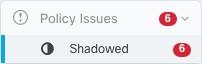
|