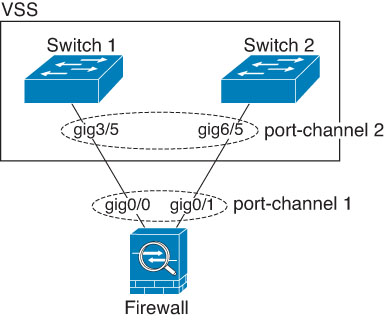
EtherChannel connection to other devices
An EtherChannel connection to other devices requires the connected device to support 802.3ad EtherChannels for compatibility.
EtherChannel connection requirements and configurations
The device to which you connect the Firewall Threat Defense EtherChannel must also support 802.3ad EtherChannels. For example, you can connect to the Catalyst 6500 switch or the Cisco Nexus 7000.
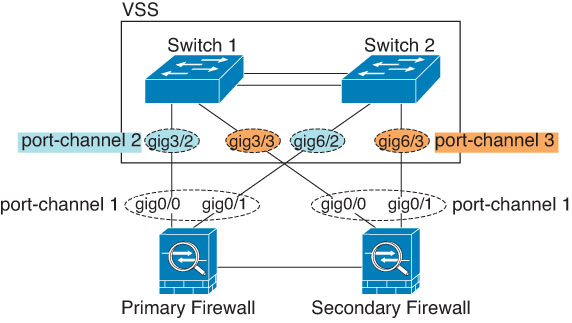
When the switch is part of a Virtual Switching System (VSS) or Virtual Port Channel (vPC), you can connect Firewall Threat Defense interfaces within the same EtherChannel to separate switches in the VSS/vPC. The switch interfaces are members of the same EtherChannel port-channel interface because the separate switches act like a single switch.
Note | If the Firewall Threat Defense device is in transparent firewall mode, and you place the Firewall Threat Defense device between two sets of VSS/vPC switches, then be sure to disable Unidirectional Link Detection (UDLD) on any switch ports connected to the Firewall Threat Defense device with an EtherChannel. If you enable UDLD, then a switch port may receive UDLD packets sourced from both switches in the other VSS/vPC pair. The receiving switch will place the receiving interface in a down state with the reason "UDLD Neighbor mismatch". |
If you use the Firewall Threat Defense device in an Active/Standby failover deployment, you need to create separate EtherChannels on the switches in the VSS/vPC, one for each Firewall Threat Defense device. On each Firewall Threat Defense device, a single EtherChannel connects to both switches. Even if you could group all switch interfaces into a single EtherChannel connecting to both Firewall Threat Defense devices,the EtherChannel would not be established because of the separate Firewall Threat Defense system IDs. Also, using a single EtherChannel would not be desirable because you do not want traffic sent to the standby Firewall Threat Defense device.