How Clientless Zero Trust Network Access works
Summary
The key components involved in the Zero Trust Access clientless workflow are:
-
User: Initiates access requests through a browser and provides authentication credentials.
-
Identity Provider (IdP): Handles user authentication including primary and multi-factor authentication challenges.
-
Threat Defense: Validates HTTPS requests, processes SAML responses, and controls application access.
-
Application: The target resource that users access after successful authentication and authorization.
Workflow
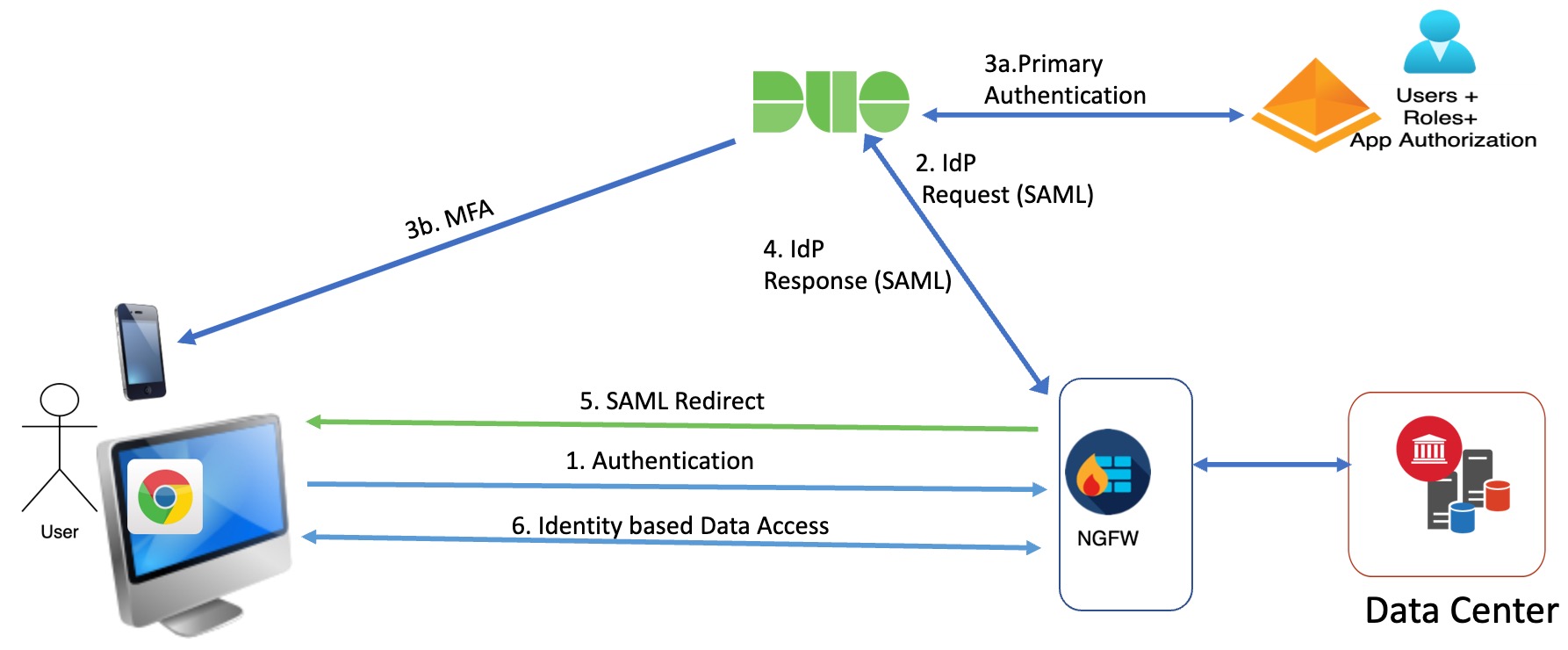
These stages describe how the clientless zero trust network access workflow processes user requests:
-
User types the application URL in the browser and threat defense validates the HTTPS request.
- If the HTTPS request is valid, the user is redirected to the mapped port.
- If the HTTPS request is invalid, the user is sent for authentication per application.
- The user is redirected to the configured identity provider (IdP).
-
The IdP performs authentication challenges for the user.
- The user is redirected to the configured primary authentication source.
- The user is challenged with the configured secondary multi-factor authentication, if any.
- The IdP sends a SAML response to threat defense. The user ID and other necessary parameters are retrieved from the SAML response through the browser.
- The user is redirected to the application.
- The user is allowed access to the application after validation is successful.