The asymmetrical routing problem
The asymmetrical routing problem occurs when return traffic for a connection goes through a different firewall than the outbound traffic. This causes packets to be dropped because they do not match existing connection entries in the fast path table.
Traffic inspection and fast path operation
By default, the Firewall Threat Defense inspects all traffic using the Adaptive Security Algorithm. The Firewall Threat Defense allows or drops traffic based on the security policy. The Firewall Threat Defense maximizes the firewall performance by checking the state of each packet (new connection or established connection). It assigns new connection SYN packets to the session management path. It assigns established connections to the fast path. It assigns packets requiring advanced inspection to the control plane path.
The Firewall Threat Defense allows TCP packets that match existing connections to pass through via the fast path without rechecking every aspect of the security policy. This feature improves performance. However, the fast path establishment method can interfere with asymmetric routing solutions. The method uses SYN packets and performs checks such as TCP sequence number validation. Both outbound and inbound flows of a connection must pass through the same Firewall Threat Defense device.
Asymmetric routing scenario
For example, a new connection goes to Security Appliance 1. The SYN packet goes through the session management path, and an entry for the connection is added to the fast path table. If subsequent packets of this connection go through Security Appliance 1, then the packets match the entry in the fast path, and are passed through. But if subsequent packets go to Security Appliance 2, where no SYN packet went through the session management path, then no entry exists in the fast path for the connection, and Security Appliance 2 drops the packets. The following figure shows an asymmetric routing example where the outbound traffic goes through a different Firewall Threat Defense than the inbound traffic:
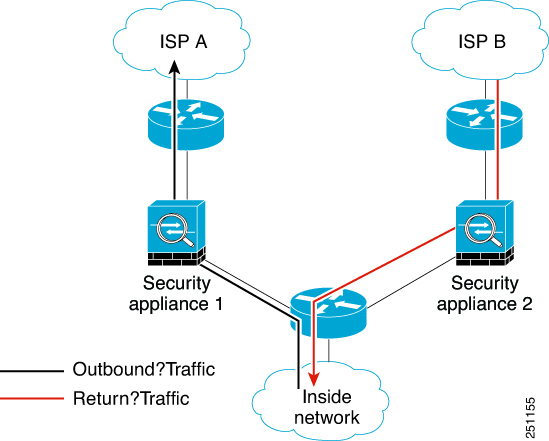
If you have asymmetric routing configured on upstream routers and traffic alternates between two Firewall Threat Defense devices, then you can configure TCP state bypass for specific traffic. TCP state bypass alters the way sessions are established in the fast path and disables the fast path checks. This feature treats TCP traffic similarly to a UDP connection: when a non-SYN packet matching the specified networks enters the Firewall Threat Defense device, and there is not a fast path entry, then the packet goes through the session management path to establish the connection in the fast path. Once in the fast path, the traffic bypasses the fast path checks.